
ELEMENTARY DEBATE
JUDGING INSTRUCTIONS
DURING THE
DEBATE
FIRST: Present Out loud this Judge Script
Missing
Debater(s)? What to do
Elem Debate Topics Rules Times
SECOND: Watch the
debate taking careful notes.
Time the speeches (ignore material stated
after time has expired though let students finish a sentence).
At the end of the Response Huddle, remind the students no viewing the internet
after that point in the debate.
AT THE END OF
THE DEBATE
FIRST:
Reply to your emailed ballot.
Type in which team won
Making Decisions of who won
Give speaker points of 61-99 points to
each debater
(keeping the debaters listed in the exact same order as was included in the
emailed ballot).
Giving Speaking Points
SEND THE
EMAILED BALLOT ASAP.
EMailing it ASAP keeps the tournament on
schedule.
SECOND:
Give Verbal Feedback.
State which team you voted for and which argument(s) convinced you to vote that way.
State a complement and a suggested improvement to each debater.
Giving
Feedback (Who won and why plus Compliments and Improvements)
THIRD: Type in
Feedback for the Debaters
Out of
time to do Feedback?
Complete it during your next break or at the end of the tournament.
JUST BE SURE TO SUBMIT YOUR FEEDBACK BY THE END OF THE
DAY to avoid upset students, coaches, and parents.
See your
Tournament's Dashboard
The Dashboard has the tournament schedule, information
on getting help, links to the postings, etc.
4 KEY SKILLS OF JUDGING
|
You need to review these 4 judging skills before
each tournament. Missing Debater(s)? What to do Giving Feedback (Who won and
why plus Complements and Improvements) |
QUICK JUDGING
Note: You are expected to
read through the judging details below at least once.
FIRST
Say hi to the students, notify tab of missing teams, begin debate
on time, watch Debate
SECOND
1. Email Reply Winner-Points immediately at end of debate*
2. Verbally tell the debaters your Reason for Decision and
Complements and Improves to each Student
3. Click Here to Type in Comments--Required
IMPORTANT REVIEW THE NEW ELEMENTARY DEBATE FORMAT
Topics, Speaking Times (huddles, q and a, etc) and Rules
*elims—you
email just the winner; no points needed.
Teams flip a coin for the final round
only.
Otherwise, all rounds are assigned by tab.
Yes, judges can judge a team again in elims.
DETAILS ON JUDGING
FIRST
1. CHECK TO
MAKE SURE BOTH TEAMS ARE READY TO GO
MISSING TEAM? Contact the tournament staff (near Pigott 205 or on Zoom Link).
Note that Online Students can
prep in the “zoom room plus 20” (so if you are using Zoom room 7, the con prep
room would be in 27).
2. AT THE
DEBATE START TIME:
Introduce yourself; Check for missing students
Your emailed ballot tells you
the first name of each debater in your round.
Missing students might be in
their prep room (breakout room is plus 20)—you can go in there and check.
Missing student and it is time
to start? Start. Don’t be late.
Tech Issues? Speaking Times? Rules?
Click here to test your Internet
Connection (Should be 10+mb down, 5+mb up or higher)
3. BEGIN THE
DEBATE ON TIME
Give them a positive comment “I’m
eager to watch this debate”
Encourage but don’t require webcam use.
4. DURING THE
DEBATE
At all
times, treat each and every debater with equity and
support.
Take notes
and be thinking about how each student can improve and as the debate finishes,
which arguments win the debate and why.
Please
listen attentively and supportively during the debate. These kids need positive
faces, non-verbals, and feedback.
SECOND
Deciding the Winner
Winner goes to the side with the
strongest argument(s) for their side of the topic.
First, consider the arguments
AND the responses and draw a conclusion about the argument.
EXAMPLE: “The
prop team showed water contamination is growing and that many cities lack the
funding and oversight to assure water is properly treated and safe. The opp team responded that cities are empowered to have safe
drinking water—but they did not show they have the money and help to make that
happen. So, I concluded that water contamination is a real problem.”
Do this for each main argument/issue in the debate.
Second, consider the strongest
arguments for both sides and hopefully using the arguments the debaters
presented, explain why one side’s argument was stronger.
EXAMPLE: “The
prop showed water contamination and weighing that argument the opp team’s cost argument, I vote prop because the prop
showed water contamination really threatens people’s lives and can have
catastrophic economic consequences whereas the opp
did not really explain nor impact the cost argument.”
2 Important Notes:
1. Don’t vote on arguments you
think of. Decide based on the arguments the students presented.
2. Impromptu topic? Treat
unsourced reasoning as strongly as facts, statistics, expert sourced arguments.
The point of impromptu debating is to rely on sound reasoning—not experts and
studies and statistics.
Giving Speaker Points
Points are 61
to 99.
91 to 99 is for kids that are supportive
and inclusive, use great AREI, do their speaker duties REALLY
well, make and respond to POI’s very effectively, have great delivery,
and speak for the full 5 minutes.
61 to 69 is for kids that need to be
more supportive and less rude, use AREI more and more strongly, need to do
their speaker duties, use POIs and respond more effectively to POIs, be more clear in their delivery, and need to speak more than 1
to 3 minutes long.
Scores from 70
to 89 are most common and are for debating between the two above.
1. IMMEDIATELY AT END OF DEBATE:
EMAIL BALLOT with
winner and points.
Please
doublecheck with the debaters about names.
In your email program, REPLY
to the emailed ballot:
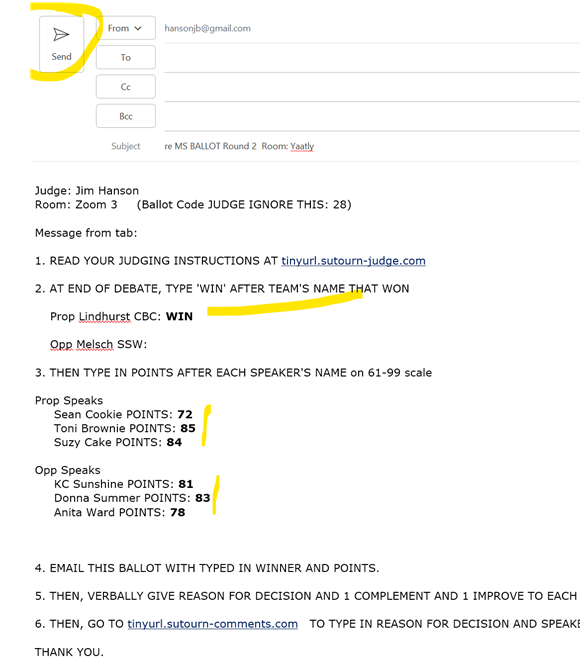
DO THIS
IMMEDIATELY—DON’T TALK.
RIGHT AWAY, EMAIL THE WINNER AND POINTS.
We need the Winner and Points immediately or the entire tournament gets
delayed.
(submitting the
online comments form does NOT complete this step—you have to
EMAIL the winner and points)
2. AFTER YOU
EMAIL WINNER AND POINTS, TALK TO THE DEBATERS:
Start with a
complement, supportive statement such as “This was a very enjoyable debate. You
did great!”
YES REVEAL
DECISION State who you voted for and give your reasons.
YES GIVE FEEDBACK
Then, state at least one complement and one improve to each debater.
After you
finish, tell the debaters to return to the main meeting room OR their school
room.
3. TYPE YOUR
DECISION AND COMMENTS
Click Here to Type in
Comments--Required
Remember:
Parents and Coaches are reading these comments. I cannot overstate how
important what you write is for these kids, coaches, and parents.
Please complete
the online comments by the end of the Prep Time for the next debate (use your next
round’s Prep Time to finish it up if needed).
Sorry—but we fine schools with
judges who do not complete online comments for each and every
round they judge.